Page 2 of 3


Step by step


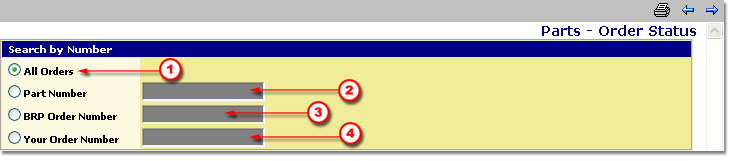
Search by Number

There are options in how to search by number, but only one at a time can be used.

All Orders searches all orders in the database
Part Number allows entry of a specific part number.
BRP Order Number allows entry of a specific BRP order number.
Your Order Number allows entry of an order number from the Dealership.


Date Range Search

To search from a range of dates, tab down to Date Range Search and enter the proper information.

In This Date, today's date will appear but you can change it to any date.


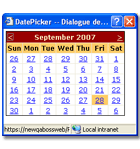
How to use the calendar:

First, navigate to the right month/year with the "<" ">"arrows.
Second, select the day by clicking on it.
Third, confirm that the right date is showing in the field.
Quick tip: To enter today’s date in a date field, simply enter a period "." and proceed by hitting the "Tab" key.
You can also change the Previous Days box to a maximum of 180 days to widen the time period being searched.


Shipping Status

In this section, select appropriate Shipping status for the order being searched.
The choices are:

  • All Orders
  • Partially Delivered
  • Totally Delivered
  • Not Delivered
  • Blocked


Submitting the PAC Order Status

To sumbit the request, use the Next/Submit ( ) arrow in the upper right corner of the screen.

This will bring up on the screen a complete list of the status of orders.


Click on the Next button to proceed with this lesson.